Fraction Slicer: Partition Shapes to Discover Equivalent Fractions
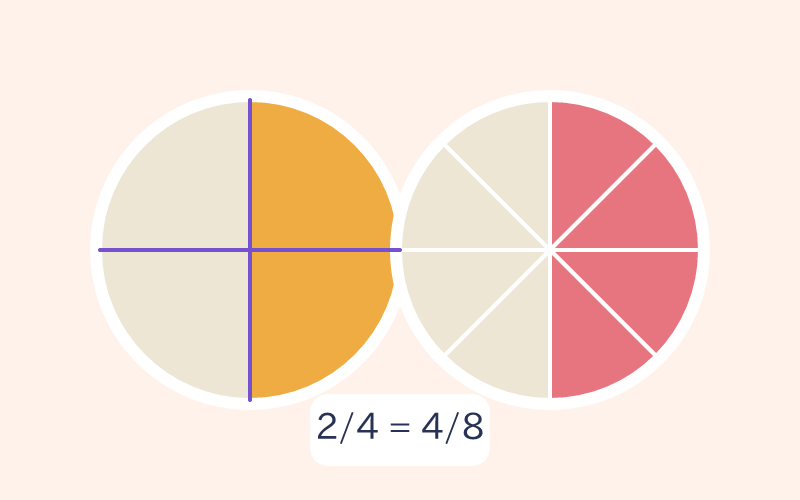
Each run generates seven target fractions with circles or rectangles and valid equal-cut choices.
Visual Partitioning: Why 3/4 and 6/8 Cover the Exact Same Area
Each run generates seven target fractions with circles or rectangles and valid equal-cut choices. Shade the target area; Reset Slices keeps the target and cut count, while replay after completion generates a new run.
Visual Fraction Models for Fourth Grade (CCSS 4.NF.A.1)
Aligned directly to CCSS.MATH.CONTENT.4.NF.A.1, this activity helps students explain why fractions are equivalent using interactive area models, forming an indispensable bridge before advancing to unlike-denominator arithmetic.
Three Skills Practiced in Fraction Slicer
- Visualize Equivalent Fractions: Confirm that partitioning does not change total shaded area.
- Connect Geometry to Arithmetic: Discover why multiplying or dividing numerator and denominator produces equal values.
- Strengthen Part-Whole Sense: Transition smoothly from visual models to algebraic fraction operations.
How to Play Fraction Slicer in 3 Steps
- Check your target fraction (e.g., 3/4).
- Select how many slices to cut your circle or rectangle into (e.g., 8, 12, or 16).
- Tap slices to shade them until the covered area matches the target fraction.
Teacher Tip: Compare Multiple Cuts
Ask learners to make the same target fraction using two different cut counts (e.g., 6 slices vs 12 slices) and compare how many blocks were shaded.
Frequently Asked Questions
Q: How does geometric slicing prove equivalent fractions?
A: Cutting a pizza into 8 slices instead of 4 cuts every piece in half; taking 6 slices covers the exact same area as 3 original quarter-slices (3/4 = 6/8).
Q: Which grade level does this target?
A: Directly aligned to Grade 4 Common Core standard CCSS.MATH.CONTENT.4.NF.A.1, and great for Grade 3-5 visual support.